[Date Prev][Date Next][Thread Prev][Thread Next][Date Index][Thread Index] [List Home]
Re: [sumo-user] Importing Shape

If there is a systematic (and simple) relationship between the centroid ids and the junction ids at the centroid location, then the easiest way would be to call od2trips with option --junctions, followed by a search-replace on the generated trips to change the centroid id into the relevant junction id.

You could also replace the from/to attribute which od2trips has set to a controid id with fromXY or fromLonLat and the respective POI coordinate. This replacement will require a minimum coding effort and should be quite doable even for non-programmers with a little help from AI-Agents.

regards,
Jakob

Am Di., 6. Jan. 2026 um 12:56 Uhr schrieb Pedro Oliveira <pedro.engenhariae@xxxxxxxxx>:
Good morning!

Yes, I imported the connectors as edges. If SUMO also has a connector structure, I can change that.

Each centroid has only one connector, which in this case, I imported into SUMO with two-way edges that share the same node.
image.png
In total, I have 687 connectors and centroids.

My preference is that vehicles enter and exit through a single point linked to the centroid.

Sds,

Pedro Oliveira

Em ter., 6 de jan. de 2026 às 04:46, Jakob Erdmann <namdre.sumo@xxxxxxxxx> escreveu:
It sounds as if you imported connectors as edges. Are there multiple connectors per centroid? If so, do they share a common junction?
How many centroids and connectors do you have overall?
Do you actually want to see vehicles driving on the connectors or do you want them to only enter the actual road network?

Am Di., 6. Jan. 2026 um 07:28 Uhr schrieb Pedro Oliveira via sumo-user <sumo-user@xxxxxxxxxxx>:
Good afternoon!

Happy New Year to all!

I have data initially in "gpkg" format that I imported into QGIS. The file is structured as follows:

1. Network links that form the road system;
2. Nodes that are the junctions of the links;
3. Polygons that represent municipalities and traffic zones;
4. Centroids that represent the points where the polygon trips begin and end;
5. Connectors that are lines that connect the centroids to the road system.
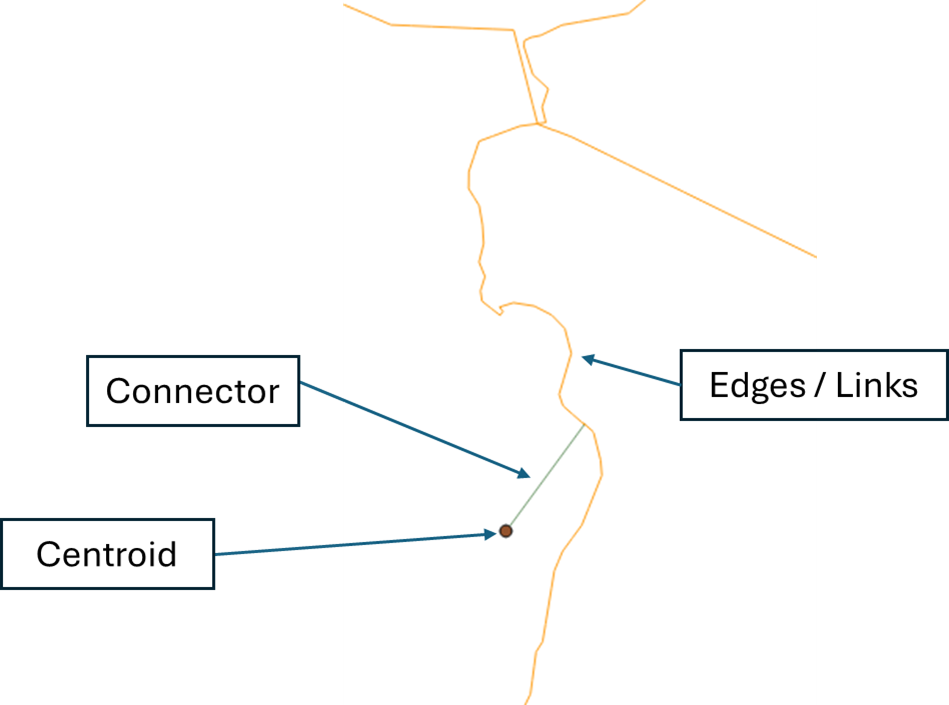
image.png

Centroids are the reference for the entire OD matrix. I believe the original basis comes from macrosimulation software (Transcad, for example) that, starting from the traffic zone polygon, calculate the centroid using the geometric center of the polygon and make the connection in the road system (through connectors) by the nearest link.

I ran netconvert.py on the road system links and connectors that were in shapefiles and merged the two into a single file.

For the centroids, I used polyconvert.exe, obtaining the TAZ.xml file, and I was able to add it to the net edit and visualize them.

My final intention was that when running edgesInDistricts.py, the edges near centroids would be recognized, but it didn't work; the file with the list of edges remained empty. I believe this is because the centroids are points instead of polygons.

I would like to know if there is any alternative.

I thought about using netconvert on the centroids and importing the points as nodes (junctions), and I could make each of these nodes a taz to run od2trips and use duarout with the --junction-taz --with-taz function, but that didn't work.

Any help would be greatly appreciated.

Best regards!

_______________________________________________
sumo-user mailing list
sumo-user@xxxxxxxxxxx
To unsubscribe from this list, visit https://www.eclipse.org/mailman/listinfo/sumo-user

Back to the top