

Eclipse IDE for Scout Developers
Eclipse Scout is a Java/HTML5 framework to develop business applications that run on the desktop, on tablets and mobile devices. This package includes Eclipse IDE support for Scout developers and...

Eclipse IDE for Rust Developers (includes Incubating components)
The essential tools for any Rust developer, including Rust language support, Git client, command-line integration, Mylyn and editors.

Eclipse IDE for RCP and RAP Developers
A complete set of tools for developers who want to create Eclipse plug-ins, Rich Client Applications or Remote Application Platform (RCP+RAP), plus Maven and Gradle tooling, and an XML editor. It...

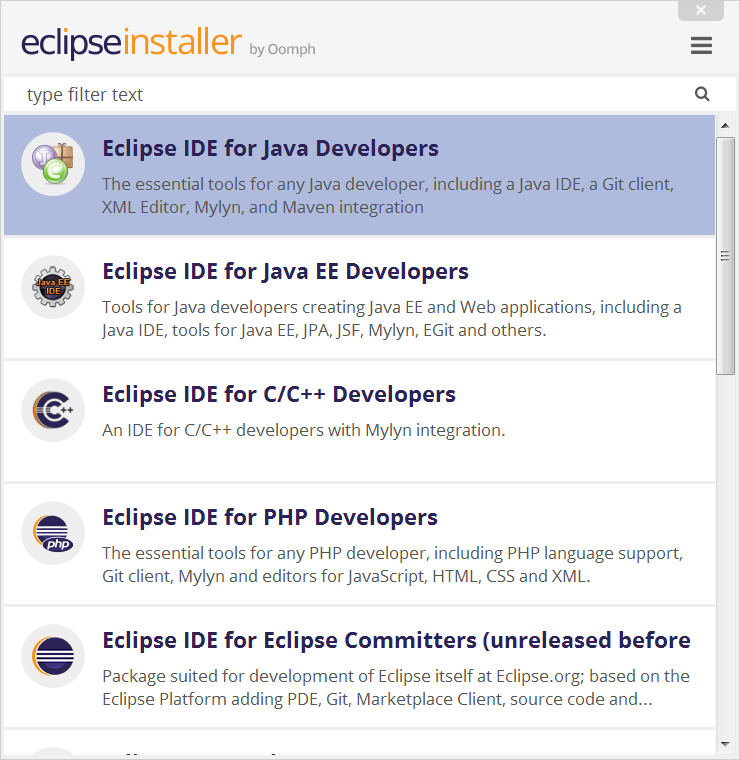
Eclipse IDE for PHP Developers
The essential tools for any PHP developer, including PHP language support, Git client, Mylyn and editors for JavaScript, HTML, CSS and XML.

Eclipse IDE for Scientific Computing
Tools for C, C++, Fortran, and UPC, including MPI, OpenMP, OpenACC, a parallel debugger, and remotely building, running and monitoring applications.

Eclipse Modeling Tools
The Modeling package provides tools and runtimes for building model-based applications. You can use it to graphically design domain models, to leverage those models at design time by creating...

Eclipse IDE for Enterprise Java Developers
Tools for Java developers creating Enterprise Java and Web applications, including a Java IDE, tools for Enterprise Java, JPA, JSF, Mylyn, Maven, Git and more. Click here to file a bug against Eclipse...

Eclipse IDE for Web and JavaScript Developers (includes Incubating components)
The essential tools for any JavaScript developer, including JavaScript, TypeScript, HTML, CSS, XML, Yaml, Markdown... languages support; Kubernetes, Angular and React frameworks support; Node.js...

Eclipse IDE for Java Developers
The essential tools for any Java developer, including a Java IDE, a Git client, XML Editor, Mylyn, Maven and Gradle integration

Eclipse IDE for Java and DSL Developers
The essential tools for Java and DSL developers, including a Java & Xtend IDE, a DSL Framework (Xtext), a Git client, XML Editor, and Maven integration.

Eclipse IDE for C/C++ Developers
An IDE for C/C++ developers with Mylyn integration.