
Equinox Aspects – Quick-start guide
The following steps are intended to help you getting started with Equinox Aspects. Please also take a look at the "Hello world!" demo (from the link for from CVS) which is used as an example at some points.
The following applies to the latest (milestone or development) build of Equinox Aspects which is compatible to Equinox 3.4 and AJDT/AspectJ 1.6.
- Install Eclipse 3.4 SDK.
- Install the latest version of AJDT from the AJDT update site.
- Download the latest build of Equinox Aspects.
- Equinox Aspects comes without any tooling, so you don't need install it into your development environment (SDK).
Note: We strongly recommend that you keep your SDK installation and Equinox Aspects separate by creating a custom target platform local to your workspace (see next section). However, if you prefer to mix your SDK with Equinox Aspects, you can extract the downloaded archive into your SDK installation and skip the next section.
- Create a "general" project (a folder), e.g. org.eclipse.equinox.weaving.demo.target.
- Copy all bundles which are required for your application into this target project, e.g. into a bundles directory. For Equinox Aspects the following bundles make up the minimal target:
- org.eclipse.osgi (The system bundle)
- org.eclipse.equinox.weaving.hook (Must be co-located with the system bundle!)
- org.eclipse.equinox.weaving.aspectj
- org.aspectj.runtime
- org.aspectj.weaver
- Optionally: org.eclipse.equinox.weaving.caching
- Optionally: org.eclipse.equinox.weaving.caching.j9
- Create a target definition (File>New>...) in the target project root, e.g. default.target.
- On the first tab (Overview) of the target definition editor select the above directory containing your application's bundles as Target Location.
- On the second tab (Content) check Include all plug-ins form the specified target.
- (Optional) If you want to use this target platform for your whole workspace, click the link Set as Target Platform in the upper right corner of the editor. If instead you want to use Equinox Aspects in selected launch configurations only, add the required bundles listed above to the target platform in the respective launch configuration dialog.
Supporting different target platforms: If you are planning to support different target platforms, e.g. with different versions of your bundles, you could also apply a version-based naming scheme to the above directory and target definintion.
For the "Hello world!" demo the target project looks like this:

- Export all packages containing aspects you want to be woven into other bundles, e.g. org.eclipse.equinox.weaving.demo.hello.aspects.
- Use Require-Bundle to declare a dependency on org.aspectj.runtime and re-export this dependency.
- Put your aop.xml file into the META-INF directory (look at the "Hello world!" demo for an example aop.xml file).
You can specify a different location using the special Eclipse-AspectContext manifest header.
For the "Hello world!" demo the bundle manifest looks like this:
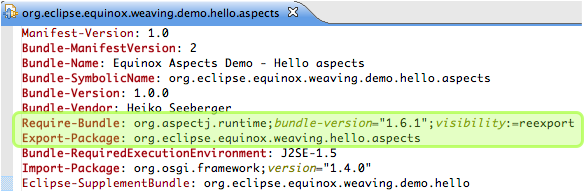
There are two ways to tell Equinox Aspects which bundles (both the aspect bundles and the target bundles) shall be woven.
- Either you use the special manifest header Eclipse-SupplementBundle in the aspects bundle to declare the target bundles for weaving, e.g. Eclipse-SupplementBundle: org.eclipse.equinox.weaving.demo.hello (like in the "Hello world!" demo manifest above).
- Or you require the aspect bundle(s) in the target bundle's manifest, e.g. Require-Bundle: org.eclipse.equinox.weaving.demo.hello.aspects.
Effectively this means you can make the dependency between aspect and target bundles in the direction you prefer.
- Tell Equinox to use org.eclipse.equinox.weaving.hook as a framework extension (in the "VM arguments" of your launch configuration, add -Dosgi.framework.extensions=org.eclipse.equinox.weaving.hook).
- The AspectJ weaving service (bundle org.eclipse.equinox.weaving.aspectj) must be started before any classes are loaded from any bundles targeted for weaving.
For the "Hello world!" demo, applying all these steps will result in printing "Hi from HelloAspect ;-)" when the bundle org.eclipse.equinox.weaving.demo.hello is started (after the AspectJ weaving service).

You should now be able to implement your aspects.
What next?
Have a look at the example projects in the CVS (equinox-incubator/aspects/demos).
Using Equinox Aspects with Eclipse Applications and JUnit Plugin Tests: (Eclipse 3.4)
To ensure that the weaving service bundle is started early enough, you need to use a custom config.ini: Add the aspect bundles and set their start level to something smaller than the weaving target bundles.